
Blog
Complete YouTube Studio Setup Guide (Camera, Lights, Sound)

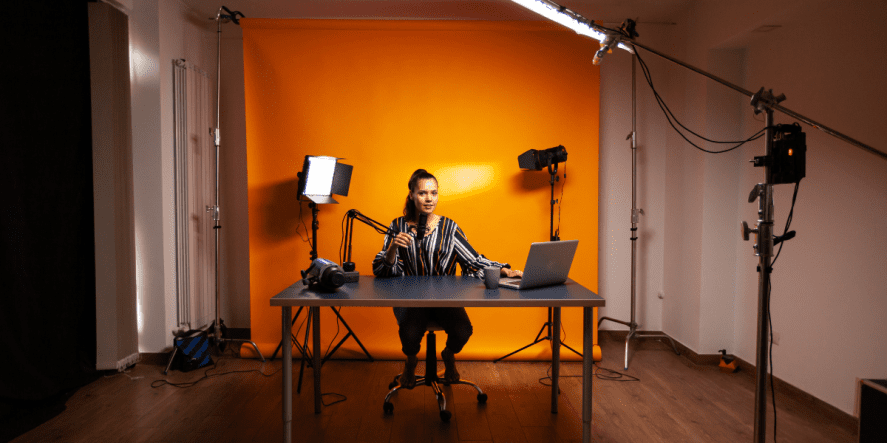
You’ve decided to start a YouTube channel. Maybe you’ve been thinking about it for months, practicing what you’ll say in your first video, waiting for the perfect moment. Here’s a truth most creators find out the hard way: the best time to start is now, but only if your equipment and setup don’t get in the way of making good content before anyone even watches.
A strong YouTube studio is not about owning the most expensive gear on the shelf. It is about understanding what each piece of equipment does for your audience. Viewers will forgive a slightly shaky shot. They will not forgive audio that sounds like it was recorded inside a tin can.
This YouTube studio setup guide walks you through everything you need to build a functional home studio that produces content you are proud to publish.
Why Your Studio Setup Matters More Than Your Script
You could have the most compelling content idea in the world, but if your video looks dim and your audio crackles, people will click away within seconds. Even simple upgrades can significantly improve average view duration, which is a meaningful jump on a platform that lives and dies by watch time.
Your studio is the first impression your channel makes. A clean, well-lit background communicates professionalism. Crisp audio builds trust. Let us show you how to achieve both without breaking the bank!
Building Your Home Studio Setup for YouTubers
Choosing the Right Room
Before you buy a single piece of gear, think carefully about your space. Your room matters more than your camera. Avoid bare walls and tiled floors. Curtains, carpets, and bookshelves naturally absorb sound and reduce echo without any additional treatment.
Dedicate the space if you can. A permanent studio that is always ready to shoot removes the procrastination barrier that kills so many channels before they find their footing. When your gear is set up and waiting, hitting a record feels easy.
Background and Visual Environment
Your background speaks before you do. A few carefully placed shelves, a plant, some ambient lighting, or a simple, solid-colored backdrop can transform a plain room into a recognizable, brand-consistent filming space. Keep things neat and relevant to your niche. The goal is to look intentional, not staged.
Cameras: The Heart of Your YouTube Studio
The best camera for a YouTube setup depends entirely on your content type, budget, and the level of manual control you want. DSLR cameras are strong choices for cinematic videos, product reviews, and tutorials, with popular options including the Canon EOS 90D. Mirrorless cameras are compact and perfect for vloggers, with the Sony ZV-E10 and Canon M50 Mark II standing out in that category.
If you are just starting out, your smartphone is a completely legitimate camera. Today’s flagship phones shoot stunning 4K and even 8K video, though 8K is rarely necessary for most creators. Pair it with a solid tripod and good lighting, and you can produce content that holds its own against far pricier setups.
A shaky shot undermines everything else, so invest in a tripod or gimbal stabilizer from the start. If you are looking for affordable gear with great picture quality, Golden Camera offers the best camera prices in Pakistan. Check out our collection to find options that match your budget, from entry-level DSLRs to capable mirrorless bodies!
Lighting Setup for YouTube Videos
No single upgrade transforms your footage quite like good lighting. Without it, even the best camera produces flat, dull, and poorly exposed results. A solid lighting setup for YouTube videos is less about expensive fixtures and more about understanding a few key principles and applying them consistently. Here are some tips from Descript and Pure Audio Insight:
The Three-Point Lighting System
In a three-point system, the key light is your main source, placed at a 45-degree angle from your face, as explained by Alan Spicer. The fill light softens the shadows on the opposite side. The backlight separates you from the background and adds depth to the frame. Together, all the components of this three-point system give your footage a polished, intentional look that instantly signals quality to viewers.
That said, you do not always need all three. Using a single powerful key light paired with a reflector to bounce fill light onto your face can yield excellent results without overspending. All you really need is lighting that washes over you clearly while separating you from the background.
Types of Lights to Consider
Ring lights create an even, flattering glow ideal for beauty and talking-head content. Softbox lights diffuse harsh light and produce smooth, natural illumination for most content types. LED panels provide customizable brightness and color temperature for enhanced versatility. RGB lights introduce mood and creative accents to your background while remaining budget-friendly.
Natural light is free and beautiful, but it is also unreliable. Blackout curtains give you total control and ensure your lighting stays consistent from the first minute of filming to the last. Browse studio lighting equipment on Golden Camera’s website across a wide range of budgets to find what best fits your space and content style.
Sound: The Element Viewers Notice Most
Viewers tolerate imperfect video far better than imperfect audio, according to Hamed Media. Bad sound creates listening fatigue and communicates a lack of care about the audience experience. In a competitive content landscape, there is no room for poor audio.
Choosing the Best Microphone for YouTube
The best microphone for YouTube depends on your recording environment and content type. For controlled studio setups, a USB condenser microphone such as the Audio-Technica AT2020 or Rode NT-USB delivers rich, detailed vocal sound. Many seasoned YouTubers also rely on dynamic microphones like the Shure SM7B when used close to the mouth and properly powered.
For on-camera or travel shooting, a lavalier or compact shotgun microphone mounted to your camera captures cleaner audio than any built-in camera mic, without adding bulk to your kit. You can compare the prices of microphones in Pakistan at Golden Camera to find the right balance of quality and affordability before making a decision.
Acoustic Treatment
The room shapes your audio as much as the microphone does. Bare walls and hard floors bounce sound around and add noticeable reverb to recordings. A few acoustic foam panels, a rug on the floor, and a bookshelf behind you can dramatically clean up your audio with minimal cost and zero renovation required.
Essential Supporting Gear
Beyond the camera, lights, and microphone, a few supporting items complete a properly functional home studio setup for YouTubers. Here are a few that you need to add to your shopping list, according to Fivable:
A boom arm keeps your microphone at the right distance without appearing in frame. A pop filter reduces harsh plosive sounds. An audio interface converts your XLR microphone’s signal into a clean digital recording if you go the professional mic route.
The encouraging reality is that a smartphone, a ring light, and a USB microphone can produce genuinely watchable, shareable content. Build incrementally as your channel grows.
Consistency Is the Real Secret
Great equipment means nothing without consistent execution. Mark the positions of your lights. Save your camera settings. Build a shooting routine that is repeatable every single time. When every shoot looks the same, your editing becomes faster, and your brand becomes recognizable.
FAQs
What equipment do I need to start a YouTube channel?
To start a YouTube channel, you need a camera (your smartphone works perfectly well), a microphone for clean audio, some form of lighting, and a tripod for stable shots. Video editing software completes the basic toolkit. You do not need professional gear on day one. Prioritize audio quality above everything else, as viewers are most sensitive to bad sound. Build your setup piece by piece as your channel grows and your budget allows.
What is the best budget setup for YouTubers?
A reliable budget setup includes your smartphone, a basic ring light, and a USB condenser microphone like the Audio-Technica AT2020. Free editing software like DaVinci Resolve handles post-production. Focus on a clean background and consistent lighting. This level of setup is more than adequate to launch a channel that looks and sounds professional enough to attract and retain a real audience.
Do I need professional lighting for YouTube videos?
No, professional lighting is not required. What you do need is consistent, controlled lighting. A single LED softbox or ring light at a 45-degree angle achieves polished, intentional results. Natural window light also works well if you film at the same time each day. The key is to avoid mixed light sources and backgrounds that are brighter than your subject. Control and consistency matter far more than expensive fixtures.
Which microphone is best for YouTube recording?
The best microphone for YouTube recording depends on your environment. For treated studio spaces, a USB condenser like the Rode NT-USB or Audio-Technica AT2020 delivers excellent clarity. For untreated rooms, a dynamic mic like the Shure SM7B rejects background noise more effectively. For travel vlogging, a compact shotgun or lavalier works best. Beginners will find the condenser microphones reliable and affordable starting points.
Can I start YouTube with a small home setup?
Absolutely. Some of the most successful YouTube channels in the world began in bedrooms with minimal gear. A quiet corner, decent lighting, a smartphone on a tripod, and an affordable lavalier microphone are enough to get started. What matters most is the consistency of your content and the clarity of your message. Start small, learn as you go, and upgrade one element at a time as your channel gains traction.
Final Thoughts
Building a YouTube studio is a process, not a purchase. You start with what you have, identify the weakest link, fix it, and keep moving forward. Control your light, clean up your audio, stabilize your camera, and create a background that tells viewers who you are before you even say a word. The creators who grow consistently are not the ones with the most expensive gear. They are the ones who show up regularly with a setup that works and content that resonates. Use this as your foundation, invest smartly, and keep the camera rolling.
Golden Camera is your one-stop destination for professional YouTube studio gear in Pakistan. From cameras and microphones to studio lighting equipment, we offer everything content creators rely on. Visit our website today to get affordable YouTube Studio essentials in Pakistan!