
Blog
How to Avoid Chromatic Aberration in Your Photos

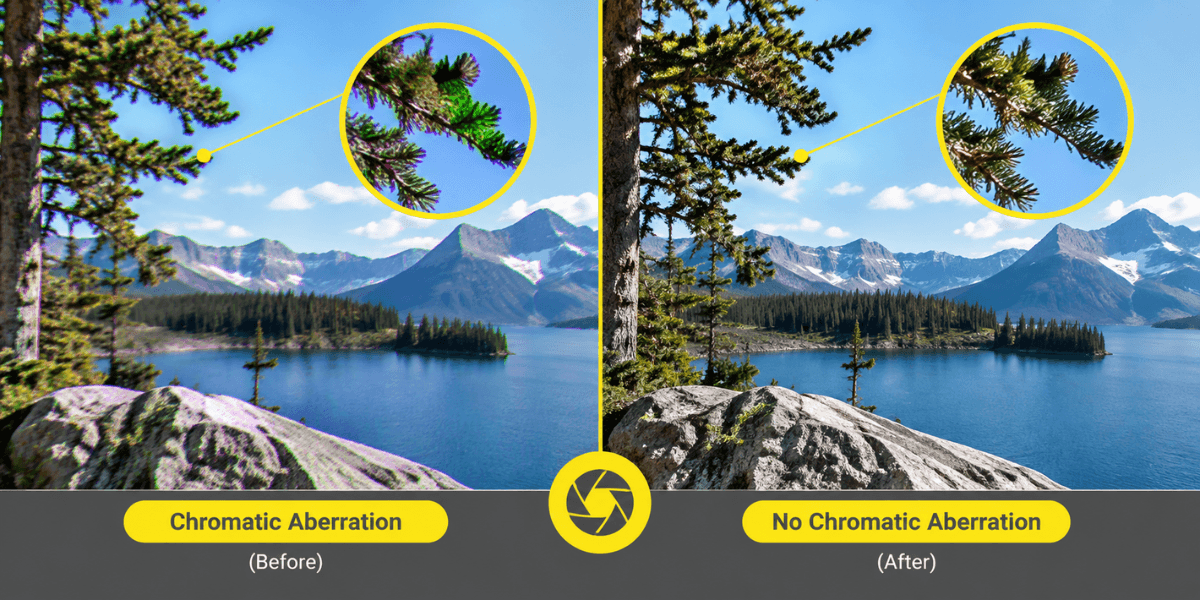
Chromatic aberration can turn an otherwise stunning photo into a distracting mess, with unwanted purple, green, or red fringes around sharp edges. The issue often appears in high-contrast areas, where lens limitations affect how colors come into focus.
Learning how to avoid chromatic aberration helps you capture cleaner details, improve image quality, and spend less time correcting color flaws during editing. A few smart shooting techniques and the right camera settings can make a noticeable difference.
Understanding Lens Chromatic Aberration
Lens chromatic aberration happens when a lens does not focus all colors of light at the same point. The result is colored fringing, most often along high-contrast edges. Most lenses can show some degree of chromatic aberration under certain conditions, although modern optical designs can suppress it very effectively. Left unchecked, it can also reduce sharpness, which is why many photographers work to prevent or remove it.
Lateral Chromatic Aberration
Lateral, or transverse, chromatic aberration appears as colored fringes along high-contrast edges and is often more noticeable toward the edges of the frame. Editing software can frequently correct it effectively.
Why Purple Edges Appear
Purple fringing often becomes visible around bright, high-contrast edges or specular highlights. Chromatic aberration can contribute, although other optical and sensor-related effects can produce similar colored fringes.
Longitudinal Chromatic Aberration
Longitudinal, or axial, aberration happens when various colors focus at different points, either in front of or behind the focal plane. This type is often more noticeable at wide apertures and may appear as magenta or green fringing around out-of-focus areas.
| Type | Where It Shows | Helpful Fix |
| Lateral | High-contrast edges, especially toward frame edges | Automatic CA correction |
| Longitudinal | In front of and behind the focus plane, especially at wide apertures | Stop down and use Defringe controls |
Key Causes of Chromatic Aberration
Light contains several wavelengths, and glass bends each one slightly differently. This variation makes it hard for a lens to bring every color to the same focal plane. Lens design, glass quality, and element arrangement all affect how well the lens corrects the difference.
Certain scenes make the problem easier to see. Backlit subjects, dark objects against a bright sky, and shiny metallic edges create strong contrast, and that contrast reveals fringes that might otherwise go unnoticed.
Focal length and aperture also play a role. Many zoom lenses show more fringing at their extreme settings, and shooting a budget lens wide open increases the chance of seeing it. That is why the settings you choose matter almost as much as the lens itself.
Practical Ways to Reduce Color Fringing
Knowing how to reduce chromatic aberration in the field saves you a lot of editing time later. These six habits are the most useful ones to build.
Stop Down the Aperture
Choosing a narrower aperture, such as f/8, usually lessens lens defects. Adjust ISO or shutter speed to compensate for the lost light, mainly to reduce longitudinal fringing.
Choose a Middle Focal Length
Many zoom lenses show more fringing at their extreme focal lengths. Setting the zoom near the middle of its range often gives cleaner edges.
Avoid Harsh High Contrast Scenes
Strong contrast makes fringing flare up. Adjust your composition, change the background, or wait for gentler light when you can.
Keep the Subject Near the Center
Fringing is often stronger toward the edges of the frame. Placing your main subject closer to the middle helps, and you can crop away edge fringing when a smaller final image is acceptable.
Shoot in RAW
RAW files retain more information, giving you more flexibility when you correct fringing later. This simple setting supports every other tip here.
Choose Better Optics
Lenses with low-dispersion elements are designed to handle color fringing more effectively. Better glass also improves sharpness, focusing, and overall image quality. These six habits work well together, so use as many of them as the situation allows.
Get more control over color fringing with the Sigma 35mm F1.4 Art Lens from Golden Camera. Explore its optical design and find out how the right lens can help you capture cleaner edges and more detailed photos. Shop now!
How to Remove Purple Fringing
Some fringing will slip through even when you shoot carefully, and editing is a reliable safety net. Here is how to correct color fringing during editing with a few simple steps.
Use Automatic Correction
In Lightroom, tick the Remove Chromatic Aberration box inside the Lens Corrections panel. This handles many simple cases with a single click.
Fine-Tune With Defringe Controls
If purple or green edges remain, use the Defringe controls. Sample the colored fringe with the selector, then adjust the slider until the edge looks natural.
Try Black and White as a Last Resort
Converting to black and white can hide stubborn color fringes. It will not fix any softness caused by the aberration, so it works best as a final option.
FAQs
1. Why is this lens-related issue more noticeable in certain scenes?
Scenes with strong contrast, such as backlit subjects or dark objects against bright skies, expose fringing clearly, and the effect becomes more obvious when you zoom in. Understanding the causes of chromatic aberration helps you predict these situations before you press the shutter.
2. Which types of lighting can make color fringing more visible?
Bright light behind the subject and bright skies behind dark objects raise contrast along edges. Softer light lowers contrast, so fringes are usually less obvious. Shooting in these gentler conditions is a practical habit worth building.
3. Does lens quality affect how much color fringing appears?
Yes. Every lens shows some fringing, yet better lenses, especially those with low-dispersion elements, show noticeably less. A higher price doesn’t remove fringing entirely, but it does lower the chance it becomes distracting.
4. Can camera settings help reduce the problem while shooting?
They can. A narrower aperture, a middle focal length, and a centered subject all help. Keep in mind that a narrower aperture mainly reduces longitudinal fringing.
5. Can photo editing software correct the issue after taking a picture?
Yes. Programs such as Lightroom offer a one-click removal option and defringe controls for leftover purple or green edges. Results vary, so combine editing with careful shooting for the best outcome.
Final Thoughts
Chromatic aberration can feel discouraging, but it is manageable with the right habits. Pay attention to aperture, focal length, contrast, and composition while shooting, then use editing tools for whatever remains. With practice, cleaner edges and stronger images will follow. Keep testing your settings, keep reviewing your files at full size, and enjoy the process.
Reduce unwanted color fringing in your portraits with the Viltrox AF 85mm F1.4 Pro Lens from Golden Camera. Explore its optical features and find the right lens for sharper, cleaner-looking images. Shop now!