
Blog
Zoom H1 XLR vs Zoom H1 Essential: What’s the Difference?

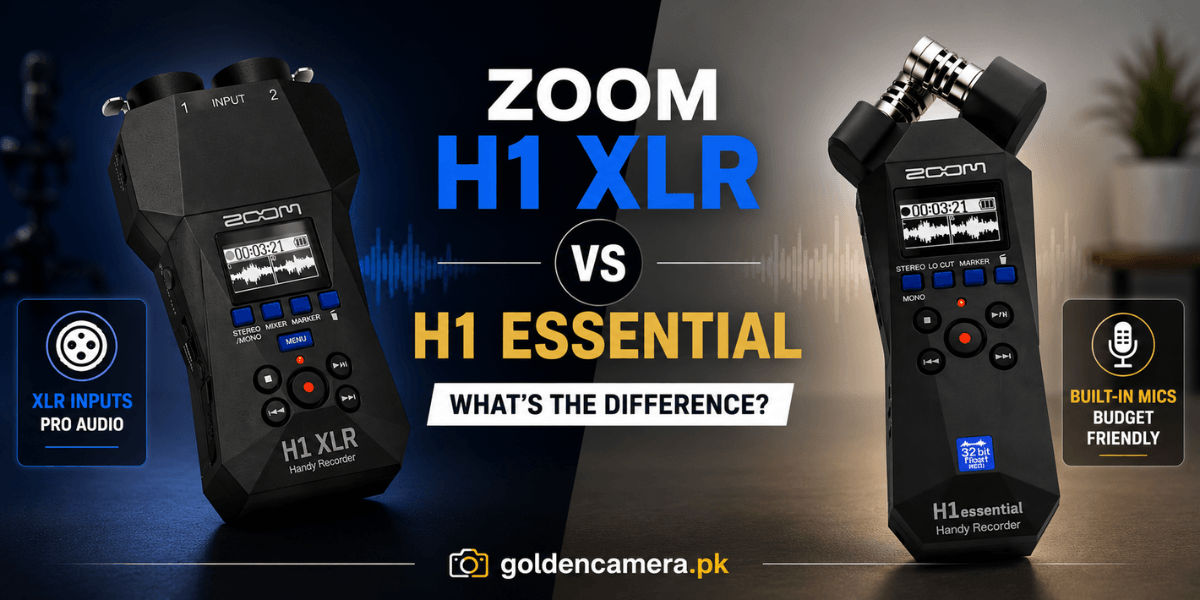
Choosing a portable recorder in 2026 comes down to a simple but important question: do you need to use your own microphones, or will a great built-in mic be enough? The Zoom H1 XLR vs H1 Essential comparison puts those two philosophies side by side in two of the most compact and affordable recorders Zoom has ever released.
Both share the same 32-bit float recording technology. Both are small enough to fit in a jacket pocket. But they are built for meaningfully different workflows, and choosing the wrong one for your use case means missing out on features that matter for your specific recording setup.
This guide covers the full difference between the two models, breaks down the Zoom H1 Essential and H1 XLR specs in detail, and helps you decide which recorder belongs in your kit.
Why Portable Recorders Still Matter in 2026
The podcasting and content creation market has grown into one of the most active segments in digital media. According to the Beamly Podcast Statistics 2026 report, worldwide podcast listeners reached an estimated 584 million in 2025 and are projected to hit 619 million by 2026, growing at a consistent upward trajectory that shows no sign of reversing.
For creators in Pakistan entering the podcasting, filmmaking, or field recording space, a reliable portable recorder is not just useful. It is foundational. Both the Zoom H1 XLR and H1 Essential offer an accessible entry point into professional audio capture, each serving a different type of creator.
Zoom H1 Essential: Built-in Simplicity with 32-Bit Float
The Zoom H1 Essential was launched in early 2024 as part of Zoom’s refreshed Essential line of handheld recorders. It brought the most important upgrade creators had been asking for, which was 32-bit float recording, into the smallest and most affordable H-series body Zoom has ever made.
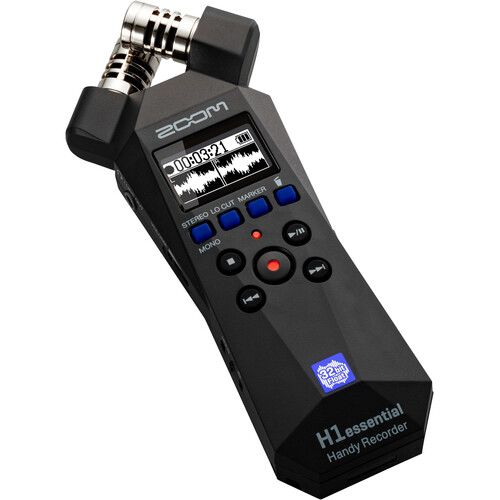
Built-in X/Y Stereo Microphones
The defining feature of the H1 Essential is its built-in X/Y stereo microphone array. These onboard mics handle up to 120dB SPL, covering everything from quiet voiceovers to moderately loud acoustic performances. The X/Y configuration minimizes phase issues and produces a natural, centered stereo image, which makes it practical for field recording, ambient capture, and solo content without any external gear.
This is the H1 Essential’s core advantage: zero setup. You press record, and it works. For journalists, travel vloggers, and casual creators who need to capture clean audio quickly and move on, the built-in mic is a genuine strength rather than a limitation.
32-Bit Float Recording
Both the H1 Essential and H1 XLR share Zoom’s 32-bit float recording capability, which is the most significant technological upgrade in this generation of H-series recorders. With 32-bit float, the recorder captures such a wide dynamic range that gain levels become essentially irrelevant. Even if a sound source unexpectedly clips, the recording can be recovered in post-production without distortion.
This is a fundamental change in how portable recording works. Rather than spending time setting and monitoring gain levels before a recording session, creators can simply press record and focus entirely on the content itself.
Connectivity and Interface
The H1 Essential connects via USB-C and includes a 3.5mm stereo microphone input for external microphones, though this input is limited to 3.5mm connections and does not support XLR microphones or phantom power. It also includes a 3.5mm line/headphone output for monitoring and camera connection.
An OLED display provides basic level monitoring and menu navigation. The recorder supports microSD cards up to 1TB and runs on two AA batteries, making it straightforward to power anywhere without relying on USB power sources.
Find the latest Zoom H1 Essential price in Pakistan at Golden Camera, where quality meets affordability. Choose an authorized source for genuine Zoom gear and enjoy a smooth buying experience from start to finish.
Zoom H1 XLR: Professional Connectivity in a Pocket-Sized Recorder
The Zoom H1 XLR was released in late 2024 and represents a fundamentally different design philosophy. Rather than including built-in microphones, Zoom stripped the H1 XLR down to its essential inputs and built a recorder around professional external microphone connectivity.
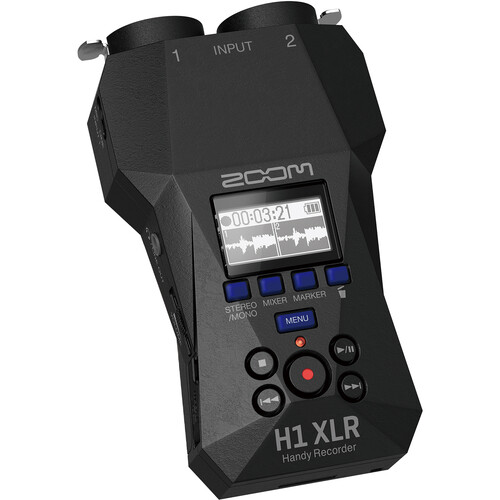
Dual XLR/TRS Locking Combo Inputs
The headline feature of the H1 XLR is its two locking XLR/TRS combo inputs, each with +48V phantom power for condenser microphones. This means the H1 XLR is fully compatible with professional studio microphones, dynamic mics, condenser mics, and virtually any XLR microphone in production use today. The locking XLR connectors prevent cables from being accidentally disconnected during a recording session, which is a practical safeguard on location shoots and live events.
A physical mic/line selector switch on each input gives operators direct hardware control over input level without menu diving, which keeps the workflow fast and intuitive even in fast-paced environments.
32-Bit Float without Gain Management
Like the H1 Essential, the H1 XLR records in 32-bit float at up to 96kHz, using dual A/D converters per input channel. The recorder constantly monitors both converters and automatically selects the best one, ensuring clip-free recordings regardless of how loud or quiet the source material becomes.
According to MusicRadar’s review, this implementation is described as a no-nonsense approach that removes the most common recording error from the entire workflow, freeing creators to focus entirely on the microphone placement and performance rather than gain management.
Additional 3.5mm Input and USB Interface
Beyond the dual XLR inputs, the H1 XLR includes a 3.5mm stereo mini-jack input with plug-in power support, making it compatible with lavalier microphones, on-camera mics, and line-level sources from mixers or audio interfaces. This third input source gives the H1 XLR flexibility that extends well beyond just two-channel XLR recording.
The USB-C port serves double duty: it connects the H1 XLR to computers and smart devices as a 2-in/2-out USB audio interface, making it practical for podcast recording directly into a DAW, live streaming, and content creation workflows where a dedicated audio interface would otherwise be needed.
Build and Power
The H1 XLR is built around a compact plastic body with a high-contrast OLED display and operates on two AA batteries. Battery life extends to nearly ten hours with phantom power enabled, according to real-world testing published by Podcast Videos (https://www.podcastvideos.com/articles/zoom-h1-xlr-recorder-review/). It also supports USB-C bus power for extended sessions connected to a laptop or power bank.
Its weight of 164g and overall dimensions make it genuinely pocketable without a case, and the camera-mount thread on the underside allows it to mount directly onto a DSLR or mirrorless hot shoe, which makes it a practical choice for videographers who need clean XLR audio without a bulkier recorder.
Are you a videographer, filmmaker, or podcast host who wants full professional microphone compatibility? Check the Zoom H1 XLR price in Pakistan at Golden Camera and get an authentic recorder backed by trusted service, competitive pricing, and expert support for your next production.
How to Use the Zoom H1 for Recording: Key Operational Differences
Understanding how to use the Zoom H1 for recording correctly depends on which model you are working with, as the operational workflow differs meaningfully between the two.
Using the H1 Essential
With the H1 Essential, setup is minimal. Power on, check the OLED display for input levels, and press record. The 32-bit float recording removes the need for gain adjustment, so the primary focus is microphone placement relative to the sound source. For interviews, the best placement is usually 20 to 40cm from the subject’s mouth, angled slightly off-axis to reduce plosives.
The 3.5mm input allows adding a lavalier or external stereo mic if the built-in array is not suitable for the recording environment, though XLR microphones require an adapter and will not receive phantom power.
Using the H1 XLR
With the H1 XLR, the first step is connecting your XLR microphone to one of the two locking inputs. Select mic or line level using the physical switch, enable phantom power from the menu if using a condenser mic, and then record. The 32-bit float recording means that no gain setting is required before pressing record.
For two-person podcast setups, connect two microphones to the two XLR inputs and set the stereo/mono mode to mono-by-two so each microphone records to its own track. The integrated mixer display allows level adjustment and monitoring for both inputs simultaneously.
Zoom H1 XLR vs H1 Essential: At a Glance
| Feature | Zoom H1 Essential | Zoom H1 XLR |
| Built-in Microphones | Yes, X/Y stereo (120dB SPL) | No |
| XLR Inputs | No | 2 locking XLR/TRS combo |
| Phantom Power (+48V) | No | Yes, per input |
| 3.5mm Mic Input | Yes | Yes (with plug-in power) |
| Recording Format | 32-bit float | 32-bit float |
| Max Sample Rate | 96kHz | 96kHz |
| USB Audio Interface | No | Yes, 2-in/2-out |
| Battery Life | Standard | Up to 10 hours (with phantom) |
| Best For | Field recording, travel, beginners | Filmmaking, podcasting, pro mics |
| Price Tier | Budget-friendly | Accessible mid-range |
Zoom Portable Recorder Comparison: Which One Should You Buy?
Choosing the right Zoom recorder depends on your recording style, connectivity needs, portability preferences, and the features that best support your workflow.
Choose the Zoom H1 Essential If You:
The H1 Essential is the right choice when the built-in mic is sufficient for your work and simplicity is the priority.
- Want a zero-setup recording experience with no external microphones required
- Record ambient sound, interviews at close range, or solo voiceovers
- Are a journalist, travel creator, or field recordist who values portability above all else
- Are building your first audio setup and want a reliable starting point at the most accessible price
Choose the Zoom H1 XLR If You:
The H1 XLR is the right choice when professional microphone quality and connection flexibility are non-negotiable.
- Own or plan to use professional XLR condenser or dynamic microphones
- Shoot video and need clean XLR audio without a bulky recorder or mixer
- Record podcasts with one or two guests using dedicated microphones
- Need a portable USB audio interface that doubles as a field recorder
- Work in environments where built-in mics would pick up too much room noise
FAQs
1. What are the major differences between the Zoom H1 XLR and Zoom H1 Essential?
The most significant difference is connectivity. The H1 XLR features two locking XLR/TRS combo inputs with 48V phantom power, allowing full compatibility with professional condenser and dynamic microphones. The H1 Essential has built-in X/Y stereo microphones but no XLR inputs or phantom power. Both record in 32-bit float at up to 96kHz. The H1 XLR also functions as a 2-in/2-out USB audio interface, which the H1 Essential does not support.
2. Does the Zoom H1 XLR support professional microphones?
Yes. The Zoom H1 XLR includes two locking XLR/TRS combo inputs with 48V phantom power, making it fully compatible with professional condenser microphones, dynamic microphones, ribbon microphones, and virtually any XLR microphone used in professional audio production. Each input also includes a physical mic/line selector switch for direct hardware-level control.
3. Which recorder is better for field recording and interviews?
For field recording where portability and zero-setup are priorities, the H1 Essential’s built-in X/Y stereo mics are excellent for capturing ambient sound, nature recordings, and close-range interviews without carrying external gear. For interview setups where microphone quality is critical, such as documentary work or podcast recordings with professional mics, the H1 XLR delivers superior results through its XLR inputs and phantom power support.
4. How do the connectivity options differ between these two models?
The H1 Essential includes a 3.5mm stereo mic input, a 3.5mm line/headphone output, and a USB-C port for power and file transfer. The H1 XLR includes two locking XLR/TRS combo inputs with phantom power, a 3.5mm stereo jack with plug-in power, a 3.5mm headphone/line output, and a USB-C port that also supports 2-in/2-out USB audio interface functionality. The H1 XLR has significantly more professional connectivity in a similar form factor.
5. Which Zoom recorder is the better choice for beginners?
The Zoom H1 Essential is the more beginner-friendly choice for most users. Its built-in microphones, simple controls, and affordable price make it a reliable starting point for anyone new to field recording, podcasting, or content creation who does not yet own or need professional XLR microphones. The H1 XLR is a better choice for beginners who are entering the field with professional microphones already in hand or who specifically need XLR connectivity from the start.
Closing Summary
The Zoom H1 XLR vs H1 Essential decision comes down to whether you need professional microphone connectivity or a reliable, self-contained recording setup. The H1 Essential delivers fast, quality 32-bit float recording with built-in stereo mics, making it a practical tool for field recording, travel content, and any scenario where simplicity and portability are the top priorities.
The H1 XLR removes the built-in mics entirely and replaces them with two locking XLR inputs and phantom power, making it the right choice for creators who work with professional microphones and need a recorder that can double as a USB audio interface.
If you’re ready to upgrade your audio setup, choose a recorder that matches the way you create. With compact portable recorders and professional recording solutions, Golden Camera offers genuine Zoom products, expert guidance, and dependable support to help you capture exceptional sound with confidence.