Blog
Shoot RAW vs. JPEG: Which format should you choose?

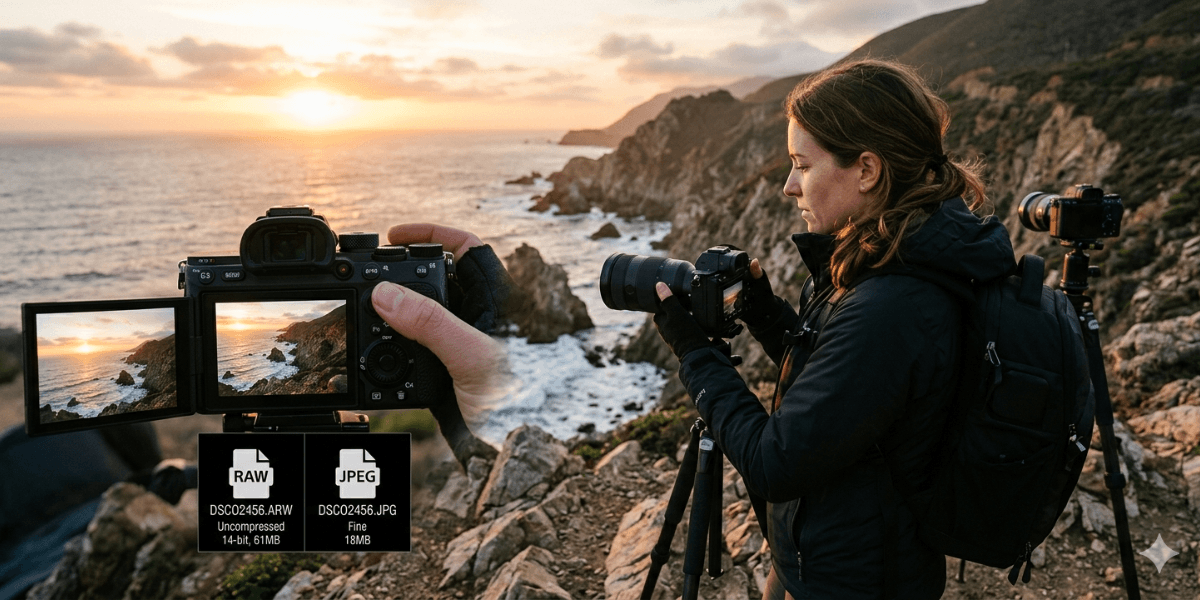
You press the shutter, and your camera records a moment that will never happen again. What happens next depends on the format you choose. This choice shapes how much control you have over your images, how flexible your editing can be, and even how your photos look straight out of the camera.
The debate around RAW vs JPEG photography has been around for years, and it still confuses beginners and experienced photographers alike. Some swear by RAW for its flexibility, while others prefer JPEG for its simplicity and speed. The truth sits somewhere in the middle, and the right option depends on how you shoot and what you expect from your images. Let’s break it down!
What Happens When You Take a Photo?
Before getting into formats, it helps to understand what your camera actually does. When you press the shutter, your camera sensor captures light and converts it into data. That data then gets processed and saved as a file.
This is where formats come in. You can either save that data almost untouched or let your camera process and compress it immediately.
What is the RAW Format?
It is a flexible file format that gives you control after the shot, rather than locking in decisions during capture. RAW files are like digital negatives. They contain all the data your camera sensor captures with minimal processing.
A RAW file keeps details such as color depth, highlights, shadows, and white balance intact. Nothing is fixed forever. That means you can adjust things later without damaging the file.
In contrast, JPEG files are processed inside the camera. The camera decides how the image should look, applies sharpening, contrast, and color adjustments, and then compresses the file to save space.
RAW vs JPEG Quality Comparison
When it comes to image quality, the difference is not always obvious at first glance. A JPEG can look sharp and vibrant straight out of the camera. That is because it has already been processed.
However, a deeper RAW vs JPEG quality comparison reveals the real difference. RAW files capture more data, often 12 to 14 bits of color, while JPEG files are limited to 8 bits. This means RAW files can store millions more color variations.
This extra data becomes valuable in tricky situations. For example:
- Bright skies with dark foregrounds
- Indoor shots with mixed lighting
- Night photography
- High contrast scenes
JPEG tends to lose detail in highlights and shadows because of compression. RAW holds onto that detail, allowing recovery during editing.
Here is a simple visual breakdown:
- RAW files retain more detail in highlights
- RAW files preserve shadow information better
- JPEG files use lossy compression that reduces file size by removing subtle image data
In many cases, a JPEG looks fine until you try to edit it heavily. That is where the limitations show.
Benefits of Shooting RAW
The benefits of shooting RAW go beyond just quality. They directly impact your creative freedom.
More Editing Flexibility
RAW files let you adjust exposure, white balance, and colors without losing quality. According to Pro Grade Digital, since there are no compression artifacts to deal with, the higher image quality enables countless editing iterations while preserving even the most delicate details.
Higher Color Accuracy
RAW files store more color information, which helps in achieving natural tones, especially for skin.
Better Dynamic Range
RAW preserves more detail from the sensor in both bright and dark areas. This is especially useful in landscapes and outdoor photography. As Adobe notes, one of the biggest benefits of RAW is the ability to recover shadows and highlights in post-processing without introducing the grainy noise typically associated with high ISO settings.
Ideal for Professional Work
Most professionals rely on RAW because it offers consistency and control across different lighting conditions.
Non-Destructive Editing
Edits made to RAW files are reversible. You can always return to the original data. As per On1, any changes you make won’t permanently alter the picture. You can always go back to the original or make more changes without reducing the picture quality.
JPEG: Simplicity and Speed
JPEG is not a bad format. In fact, it is incredibly practical in many situations.
Smaller File Sizes
JPEG files are smaller, so you can keep more images in your memory.
Faster Workflow
Images are ready to use immediately. No need for extensive editing.
Easier Sharing
JPEG files can be uploaded, shared, and printed quickly without conversion.
Ideal for Everyday Use
If you are taking casual photos or shooting large volumes, JPEG keeps things simple.
This is why many photographers still use JPEG for events, sports, and quick delivery jobs.
JPEG or RAW: Which One To Choose?
Go through this table to see which one to choose.
| Category | RAW Format | JPEG Format |
| Processing | Minimal in-camera processing (data mostly untouched) | Fully processed in-camera (sharpening, contrast, colors applied) |
| File Type Nature | Digital negative with maximum data | Compressed, ready-to-use image |
| Image Quality | Highest quality with more detail | Good quality, but limited by compression |
| Color Depth | 12–14 bits (millions more colors) | 8 bits (fewer color variations) |
| Dynamic Range | Better highlight and shadow recovery | Limited dynamic range |
| Editing Flexibility | Very high (exposure, white balance, colors adjustable) | Limited (editing can degrade quality) |
| Compression | No or lossless compression | Lossy compression (data is discarded) |
| File Size | Large (2–6× bigger than JPEG) | Small and storage-friendly |
| Workflow Speed | Slower (requires editing and processing) | Fast (ready to use instantly) |
| Ease of Use | Requires editing software (Lightroom, Photoshop) | Easy to use, share, and print |
| Storage Needs | High (more memory cards and storage required) | Low (saves space on storage devices) |
| Best For | Professional work, landscapes, portraits, low-light, high-contrast scenes | Casual photography, events, sports, quick delivery |
| Editing Type | Non-destructive (reversible edits) | Destructive (changes are permanent) |
| Sharing | Needs conversion to JPEG for easy sharing | Instantly shareable |
| Camera Performance | May slow down burst shooting on some cameras | Faster continuous shooting |
| User Control | Maximum control after shooting | Limited control (decisions locked in-camera) |
If you are looking for the best price on a DSLR camera in Pakistan, Golden Camera offers affordable cameras that support better RAW performance and storage options.
Should I Shoot RAW or JPEG?
This is a very common question, and the answer varies based on your needs.
If you are asking should I shoot RAW or JPEG, consider the following:
Choose RAW if:
- You plan to edit your photos
- You shoot in challenging lighting
- You want maximum image quality
- You are working on professional projects
Choose JPEG if:
- You want instant results
- You shoot large volumes
- You need quick sharing
- You prefer a simple workflow
Many cameras also offer a RAW+JPEG mode. This gives you both versions of the same image, which can be useful if you want flexibility as well as convenience.
Real-World Scenarios
Let’s make this practical.
Landscape Photography
RAW works best because it preserves detail in skies and shadows.
Event Photography
JPEG can be useful due to faster delivery and smaller file sizes.
Portrait Photography
RAW helps with skin tones and fine adjustments.
Travel Photography
A mix of both can work depending on your storage and editing plans.
In each case, the choice comes back to how much control you want after capturing the image.
Stats and Practical Insight
Studies and industry guides suggest that RAW files can be 2 to 6 times larger than JPEG files. This directly affects storage and workflow speed.
Another important point is dynamic range. Modern camera sensors can capture up to around 14 stops, and RAW preserves more of that range than JPEG.
These differences explain why professionals lean toward RAW, especially in demanding conditions.
RAW vs JPEG Photography
The conversation around RAW vs JPEG photography is not about one being better than the other in every situation. It is about choosing the right tool for the job.
If you want control, flexibility, and the ability to fine-tune your images, RAW is hard to beat. On the other hand, if you want speed, convenience, and ready-to-use photos, JPEG is a reliable choice. A balanced approach often works best. Use RAW for important shots and JPEG for everyday moments. As you gain experience, your preference will become clearer.
If you are still deciding whether to shoot RAW or JPEG, try both formats for a week. Compare the results, especially during editing. That hands-on experience will give you the clearest answer.
FAQs
Is RAW better than JPEG for beginners?
RAW can be helpful for beginners who want to learn editing and understand how images work. It allows more room for mistakes and corrections. However, it also requires extra time and software for processing. JPEG is simpler and faster, which can feel less overwhelming at the start. Beginners can try both formats and see which fits their learning style better.
Why are RAW files larger than JPEGs?
RAW files are larger because they store all the data captured by the camera sensor without heavy compression. This includes more color information, higher bit depth, and greater detail in highlights and shadows. JPEG files reduce size by compressing and discarding data that the camera considers less important, which results in smaller file sizes but less flexibility.
Can I convert RAW to JPEG later?
Yes, RAW files can easily be converted into JPEGs using editing software like Lightroom or Photoshop. This is one of the main advantages of RAW. You can edit the image first and then export it as a JPEG for sharing or printing. This gives you control over the final look instead of relying on the camera’s automatic processing.
Do professional photographers shoot in RAW?
Most professional photographers use RAW because it provides greater control over image quality and editing. It is especially useful in commercial, portrait, and landscape photography where precision matters. RAW helps maintain consistency across different lighting conditions and allows detailed adjustments during post-processing, which is essential for high-quality results.
When should I use JPEG instead of RAW?
JPEG is useful when you need quick results and minimal editing. It works well for casual photography, social media, and events where speed matters. It is also helpful when storage space is limited or when you need to shoot a large number of images in a short time. JPEG keeps the workflow simple and efficient.
Final Thoughts
Choosing between RAW and JPEG is less about rules and more about your photography style. RAW gives you control and depth, while JPEG offers speed and simplicity. Both have their place, and understanding their strengths helps you make better decisions behind the camera. As you continue learning, pay attention to how your images respond to editing and how much time you want to spend on post-processing. That balance will naturally guide your choice.
If you are planning to upgrade your gear with Golden Camera, going through our catalog to find the best price of cameras in Pakistan can help you find a model that supports your preferred format and workflow!